


NightOwl Companion
4.82.03K Reviews
App Specs
- Version
- 4.2.0
- Updated On
- License
- Free
- Downloads
- 100,000+
- Developer
- Resmed
- Categories
- Medical
- Platform
- Android
Screenshots
 Analysis by AppCompare
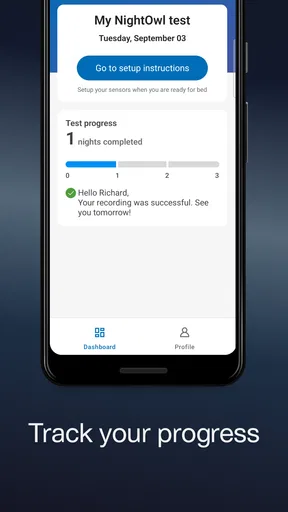
When a sleep-related medical setup involves a physical sensor, a phone app can be useful only if it helps you interact with that equipment clearly and without turning the process into another chore. That is the lens I would use for NightOwl Companion: it is a medical app from Resmed, made to work with the NightOwl sensor, rather than a general-purpose sleep tracker or a nighttime lifestyle toolkit.
What the free price does—and does not—tell you
The app is free to install, which makes trying its companion interface a low-cost step for someone who already has a reason to use the sensor. I see that as a practical advantage, but not as proof that the overall setup is free: the app and the sensor are distinct parts of the experience, and the app’s price alone says nothing about the cost of equipment or any care pathway around it. If you are deciding whether to use it, check the terms that apply to your sensor and situation rather than assuming that a free download covers everything.
That distinction also helps set expectations. This is not the kind of medical app I would download just to browse sleep advice or compare nightly scores. Its value depends on having the compatible NightOwl sensor and a specific reason to interact with it. Without that, the free price does not give you much to do.
Where a sensor companion can be useful
The most helpful way to approach a companion app is as part of a defined task: prepare the sensor, use it as directed, and then follow the relevant next steps. That is different from wearing a consumer watch and checking a dashboard each morning. A sensor-based workflow can be more focused, while a watch or a general sleep app may be better for people who want ongoing habits, broad trends, or casual self-observation.
For example, someone arranging a night at home around a sensor may want to keep the phone and equipment together, read the app’s instructions before bedtime, and avoid improvising if something is unclear. I would make that preparation part of the evening routine rather than trying to learn the workflow when tired. A companion app is most useful when it reduces uncertainty around its paired device; it is not a substitute for medical advice or a reason to interpret a result on your own.
Practical trade-offs before you rely on it
A dedicated sensor app has a narrower job than a typical wellness tracker, and that focus is both its strength and its limit. It may suit a person who needs the NightOwl sensor workflow, but it is not the right choice for someone who simply wants bedtime reminders, general sleep logging, or a broad overview of lifestyle patterns. For those goals, a regular sleep-tracking app or a wearable’s built-in tools are likely to be more relevant.
Before relying on it for a particular night, I would check that the phone is compatible, install the current app version, and make sure I understand the sensor’s instructions while I am alert. NightOwl Companion is currently version 4.2.0 and requires Android 9 or later; people on an older Android device should check compatibility before planning around it. The app is rated for Everyone, but that age label does not mean every medical workflow is appropriate for every person without guidance.
Worth Reading Before You Choose

EA SPORTS FC Mobile 26 Is a Bigger Football Game, but It Takes Time

Flipboard Shows What News Apps Must Do Beyond the Feed

Switching to Android Auto Means Rethinking Your Driving Routine

Google Calendar Makes a Crowded Week Easier to Manage

Ludo King Makes the Most of the Minutes Between Plans

Baby Panda World Brings Quick Play to Modern Phones, but Its Game Library Feels Busy
It is also worth thinking through ordinary interruptions. If you share a bedroom, work shifts, travel, or have an unpredictable evening routine, set aside a calm window to follow the sensor’s directions rather than assuming the app will adapt the process for you. If anything about setup or use is confusing, pausing to consult the instructions or the appropriate care contact is a better choice than guessing. That small bit of planning is a useful trade-off for a tool built around a specific device.
What is NightOwl Companion?
So, what exactly is NightOwl Companion? Essentially, it’s an app designed to enhance your nighttime experience, whether you're out on the town or just enjoying a quiet evening at home. It offers a suite of features aimed at making nighttime navigation and activities smoother and more enjoyable. Think of it as your digital night vision goggles, minus the bulky equipment.
Diving into the Features
One of the app's standout features is its night mode navigation. It’s super handy for avoiding those late-night mishaps, like tripping over your own feet in the dark. The interface is sleek and minimalistic, with low-light optimization that’s easy on the eyes. No more squinting at a glaring screen!
Another cool feature is the personalized alerts system. Whether you need a reminder to take a break or a gentle nudge to wind down, NightOwl has got you covered. It even syncs with your calendar to suggest optimal sleep times based on your schedule. Who knew an app could care so much about your beauty sleep?
If you’re a fan of stargazing, the app includes an astronomy guide feature. It’s like having a pocket-sized planetarium that helps you identify constellations and planets. Perfect for impressing your friends or just enjoying a quiet moment under the stars.
The User Experience
Downloading and setting up NightOwl Companion was a breeze. The interface is intuitive, and even if you’re not particularly tech-savvy, you’ll find it easy to navigate. I appreciate the thoughtfulness that went into the design, making it accessible for everyone.
The app's performance is pretty solid, with smooth transitions and quick loading times. I didn’t encounter any glitches, which is a huge plus in my book. The developers seem committed to providing a seamless experience.
Why You’ll Love It
If you’re someone who loves the night, whether it's for work or leisure, this app is a must-have. It’s got just the right mix of practical features and fun extras to keep you engaged. Plus, the fact that it’s designed specifically for night owls makes it feel like it’s tailor-made for those who function best when the sun goes down.
One thing I admire about NightOwl Companion is its focus on well-being. It’s not just about keeping you busy; it’s about helping you maintain a healthy balance, even when your days start at dusk. It’s like having a friend who reminds you to take care of yourself, even on the most hectic nights.
Choosing it for the right reason
For someone who has been directed to use the NightOwl sensor, the clearest reason to install this app is its role as the sensor’s companion. Resmed is the developer, and the app has a 4.7 average from around 21 thousand ratings, with more than 100 thousand installs. Those figures suggest many people have encountered it, but they do not tell me whether it fits a particular person’s needs or replaces professional guidance.
That is why I would not choose it over a wearable simply because it appears in a medical category. The tools serve different purposes: a wearable can be convenient for ongoing personal trends, while a device-specific companion is more relevant when the paired sensor is part of a planned process. If your goal is simply to understand whether your routine feels restful, a general tracker may be easier to use. If your goal involves the NightOwl sensor, a general tracker is not an equivalent substitute.
A realistic routine might be to check the instructions earlier in the evening, charge or prepare the phone as needed, and keep the sensor’s directions accessible before settling down. If a notification or step in the process surprises you, avoid making assumptions about what a reading means. A companion app can support a workflow, but interpreting health information is a separate matter. I would use it to complete the intended task and direct questions about results to the appropriate professional.
One non-obvious trade-off with any phone-based companion is that the phone becomes part of the bedtime setup. People who prefer to leave their phone outside the bedroom may need to reconsider that habit for the relevant session, or at least plan how the app and sensor instructions will be available. Likewise, a shared device or a phone used by several family members can make it easier to mix up whose setup is in progress. Keeping the app workflow tied to the intended user and sensor is a sensible precaution.
Another practical tip is to avoid waiting until the last minute to resolve basic compatibility or setup questions. The app supports Android 9 and later, so an older phone may be a barrier even if the sensor is available. Anyone using iOS should check the version offered for their device before making plans. In either case, the useful question is not whether the app looks appealing in isolation, but whether the phone, sensor, and instructions work together for the task you have been given.
How I’d judge its value
The app is free, and that is a straightforward benefit, but the real value is conditional: it is useful when the NightOwl sensor is relevant to you and offers little reason to install it otherwise. I would not treat its rating or install count as a recommendation to use it without the sensor. Nor would I assume that an app download answers questions about equipment, coverage, or clinical suitability; those depend on the circumstances around the device.
There are more than 1,800 written reviews, which can help prospective users see the kinds of experiences people choose to share, but reviews are not a substitute for clear instructions for your own sensor. I would pay attention to practical comments about setup and compatibility while remembering that another person’s phone, routine, or care plan may differ from yours. The app is for Everyone by its age rating, yet the medical context still calls for using it as intended.
For everyday wellness, the usual alternatives are more flexible: a sleep diary can help you notice patterns without a dedicated sensor, and a wearable can offer recurring personal tracking. Those tools have their own limitations, but they make more sense when the aim is broad self-monitoring. NightOwl Companion belongs in a narrower lane. Its advantage is being associated with its sensor; its limitation is that this connection also makes it less useful to people who do not need that device.
Final Thoughts
Overall, NightOwl Companion is an impressive app that delivers on its promises. It’s got a little something for everyone, whether you’re a night shift worker, a party-goer, or just someone who enjoys the tranquility of the night. The thoughtful design and array of features make it a valuable addition to your smartphone arsenal.
If you’re ready to embrace the night with a trusty digital companion, I’d say give NightOwl Companion a try. It might just become your new best friend in the wee hours!
My recommendation
I would install it if I had a clear reason to use the NightOwl sensor and a compatible phone, then follow the sensor’s directions rather than treating the app as a general sleep coach. I would skip it if I wanted a standalone tracker, bedtime reminders, or an astronomy tool; those expectations do not match its actual role as a sensor companion. The best buy-or-skip decision here is simple: the download costs nothing, but it is worth your attention only when the paired device is part of your needs.
Pros
- User-friendly interface for easy navigation.
- Tracks sleep patterns accurately.
- Integrates well with wearables.
- Customizable sleep goals and reminders.
- Provides detailed sleep analytics.
Cons
- Limited free features available.
- Requires in-app purchases for full access.
- Can drain battery quickly.
- Notifications can be intrusive.
- Initial setup can be time-consuming.
FAQs for NightOwl Companion
What is NightOwl Companion and how does it enhance my device experience?
NightOwl Companion is an app designed to optimize your device for nighttime use. It adjusts screen brightness, filters blue light, and offers a customizable dark mode to reduce eye strain and enhance comfort during late-night browsing or reading. Users appreciate its seamless integration and personalized settings.
Is NightOwl Companion compatible with all Android and iOS devices?
NightOwl Companion is compatible with most modern Android and iOS devices. However, it’s always a good idea to check the app’s specific requirements on the download page to ensure your device is supported. Some older models may not fully support all features.
How does NightOwl Companion impact battery life?
NightOwl Companion is designed to be energy efficient. By reducing screen brightness and filtering blue light, it can actually help extend battery life during nighttime use. However, the impact may vary depending on your device and usage patterns. Users report minimal battery drain when using the app.
Are there any in-app purchases or subscriptions required?
NightOwl Companion offers a free version with basic features. For advanced features such as customizable themes and automatic scheduling, a one-time purchase or a subscription might be required. Check the app store listing for details on pricing and available features.
Is NightOwl Companion safe to use and how is user data handled?
NightOwl Companion prioritizes user privacy and security. It does not collect unnecessary data and adheres to strict privacy policies. Any data collected is used solely to improve the app’s functionality and user experience. Always review the privacy policy on the app’s official page for comprehensive information.


